

ScreenCannon for Windows
- Free
- 3.4(12)
- 1.4K
- V 1.0
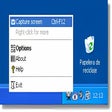
This small utility is designed for single task - taking screenshots (capturing screens) from any applications, including games, DVD/Video movies, etc. ScreenCannon saves screenshot directly to disk, excluding clipboard. In addition, ScreenCannon can autogenerate screenshot file name and folder based on current time or currently running application. You can also take screenshots of rectangular areas of screen (dragging rectangle by mouse)
Features:
- Taking screenshots of shole screen or any rectangular part
- Works in all applications including games, DVD/Movie players, etc.
- Screenshot is automatically saved to disk. File name and folder can be autogenerated from current time, active application, etc.
- Screenshot can be automatically signed or resized, can be saved in Jpg format rio)
ScreenCannon for PC
- Free
- 3.4(12)
- 1.4K
- V 1.0





Discover more programs

anyTV
- 3.2
- Free
Efficient Screen Capture Tool for Windows
BAO TV
- 2.7
- Free
Grab VHS and BETA video and audio on Windows 98

TvAnts
- 3.2
- Free
Comprehensive Screen Capture Tool for Windows
Capture Solution
- 3.5
- Trial version
Capture still images of everything including video

BrowserCap
- 3.9
- Trial version
Screenshots exactly as you see them

Amor Screen Capture
- 2
- Trial version
Capture any part of your screen

Zattoo
- 3.5
- Free
Watch TV on your PC for free

ScreenParts
- 4.5
- Free
ScreenParts: Efficient Screen Capture Utility
HS VideoCapture
- 3.8
- Trial version
Capture variously sourced videos to AVI

Remote Screenshot Grabber
- 4.4
- Free
Remote Screenshot Grabber

Fergo Screenshot
- 3
- Free
Easy screen capturing tool

TVR
- 4.6
- Free
Efficient Screen Capture Tool for Windows