Fergo Screenshot for Windows
- Free
- 3(66)
- 36.4K
- V 1.2.34
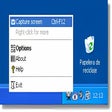
Fergo Screenshot is basically a screen capture application, supporting five file formats and an automated naming and resizing algorithm.
Here's the complete feature list:

- Supports JPG, PNG, BMP, GIF and TIF
- Quality control in JPG files
- Automated naming and option to add date and time
- Full-screen capture or only active window
- Automatic resizing if requested
- Resizing filtering options
- System tray support
- Play sound when capturing
- Support for third party themes
- No installation, just extract the rar content
- Multi-language support
Fergo Screenshot for PC
- Free
- 3(66)
- 36.4K
- V 1.2.34
Discover more programs

EasyCapture
- 3.2
- Free
Free full-featured capturing tool

anyTV
- 3.2
- Free
Efficient Screen Capture Tool for Windows
BrowserCap
- 3.9
- Trial version
Screenshots exactly as you see them

ZScreen
- 3.5
- Free
Efficient Screen Capture Tool for Windows

DemoCharge
- 2.1
- Trial version
Image capture, screen recorder and cemo creation tool
Ushot
- 4.7
- Free
Ushot Screen Capture Tool
DVapp
- 1
- Free
Capture DVs very easily
Amor Screen Capture
- 2
- Trial version
Capture any part of your screen

ScreenCannon
- 3.4
- Free
Take semiautomatic screenshot captures
HS VideoCapture
- 3.8
- Trial version
Capture variously sourced videos to AVI

BAO TV
- 2.7
- Free
Grab VHS and BETA video and audio on Windows 98

Laws concerning the use of this software vary from country to country. We do not encourage or condone the use of this program if it is in violation of these laws. MySoftwareGuide may receive a referral fee if you click or buy any of the products featured here.