





1.8
Trial version
WinSketch Pro Area Calculator
Work out the square footage of any area


Safe & trusted downloads
The best software, verified by experts
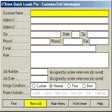
HVAC load calculator for accurate energy analysis
QuickLoads Pro is a professional-grade HVAC tool built to calculate heating and cooling loads for residential and commercial spaces. It’s aimed at contractors, engineers, and students who need fast and reliable thermal load estimates without relying on fully featured design software. By factoring in building envelope components, local climate data, window types, and insulation levels, it delivers accurate energy analysis in minutes.
The software simplifies the math behind HVAC sizing, offering both whole-building and room-by-room calculations. While not ACCA-approved—particularly for duct or full A/C load analysis—it remains a solid, task-focused solution for quick assessments, seasonal energy projections, and on-the-go fieldwork.
QuickLoads Pro balances accessibility with analytical power for basic HVAC assessments. Users can input specifics like wall type, insulation value, glazing percentage, window orientation, and square footage to estimate thermal performance. It computes heating and cooling loads based on local climate, occupancy, and HVAC system specs. However, because it is not ACCA-approved—particularly for ductwork or full A/C load calculations—its results are best suited for preliminary analysis, educational use, or informal field estimates.
The software adapts to different user skill levels. Entry-level users can rely on default presets for materials and system data, while seasoned professionals can customize values for greater control. Outputs include BTU estimates, room-by-room breakdowns, and seasonal performance summaries with hourly data. While these are useful for early-stage planning or client-facing documentation, they are not certified for ACCA-compliant design work. The interface favors clarity, keeping workflows structured and approachable.
QuickLoads Pro runs efficiently on modern Windows systems and doesn’t require high-end hardware, making it ideal for field laptops or student setups. Installation is quick, and processing times remain fast even on larger models. While it lacks features like cloud syncing, CAD plugins, or mobile access, it compensates by staying lightweight and responsive. The free trial provides a strong preview of its core features, though advanced modeling and export options require a paid license.
QuickLoads Pro isn’t built to rival full HVAC design suites, but it fills a critical gap for users who need quick, standards-based load calculations without the learning curve or overhead. Its speed, clarity, and low system demand make it perfect for site visits, student projects, or fast client estimates. While visually dated, it gets the job done with precision and efficiency—making it a worthwhile companion for field professionals and educators alike.
Trial version
Work out the square footage of any area
Free
Numeral: A Free Windows Calculator App

Free
Efficient Calculator Software for Windows Users
Free
SpeQ: A Versatile Calculator for Windows

Paid
Empowering professionals and students with versatile calculations

Free
Curly Lion: A Free Windows Calculator Tool

Effective PDF Editing Software for Professional and Private Use
Combine documents with PDF Binder

The Windows Phone app for Desktop can Help you Manage your Device

Free and Professional Cheque Writing Software

Download Corel WordPerfect Office for Windows – A Reliable Alternative to Mainstream Office Suites

A Trial version Productivity program for Windows

Simple PDF conversion with BCL easyConverter Desktop

Free Classic Notepad for Personal and Professional Use

Efficient Text Editing with NoteTab Light

All-in-one task manager for PC

Streamline e-commerce with smart workflows
Convert PDF to Excel(.xlsx) with OCR in batch conversion mode