





4.1
Free
OS Phone: Home Launcher
iOS-style home launcher for Android with integrated Control Center


Safe & trusted downloads
The best software, verified by experts
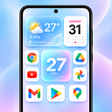
<h2>iOS-style launcher for Android with Control Center</h2>
OS Launcher 26 - Home Screen, from TechZenith JSC, replaces the Android home screen to emulate an iOS-style interface and navigation. The launcher offers home-screen replacement with rounded icons, a dock, swipe gestures, and an integrated Control Center for quick toggles. It bundles an App Library, Assistive Touch, smart search, and configurable widgets, aimed at Android users who prefer iOS visual organization while retaining Android flexibility.
The launcher replaces Android's default home with an iOS-style layout, using rounded icons, a dock and page-based app arrangement. It adds an App Library that automatically categorizes installed applications, and a pull-down Smart Search for apps, contacts, and web results. Assistive Touch provides a floating shortcut for home and recent apps, giving alternate navigation without modifying installed apps or data.
Customization covers icon sizing, labels and grid placement. The launcher supports third-party icon packs and lets users hide apps from the main screens. Widgets follow iOS-style designs and include weather, battery, and calendar modules. Controls exposed to the user include:
The developer designed the launcher to run smoothly across many devices, and the app is advertised as avoiding significant battery drain or system lag. Because it replaces the default home app, it runs persistently as a foreground launcher process; performance therefore depends on device hardware and other background apps. TechZenith notes general optimization for modern Android versions, typically Android 5.0 and up.
Setting the launcher as the default home screen uses the system default apps menu; navigate to Settings, Apps or Default Apps, then choose Home App and select the launcher. The app does not remove installed apps or data, it only changes the home interface. Community feedback notes smooth animations and consistent behavior on many devices, indicating reasonable stability across typical Android phones.
OS Launcher 26 suits Android users seeking a close iOS-like home experience without new hardware; its distribution is free with ad-supported features, so advertising appears unless you remove it. The launcher matches the visual goals of personalization-minded users while requiring acceptance of in-app promotions and occasional interface adjustments as you adapt from Android defaults.
Free
iOS-style home launcher for Android with integrated Control Center

Free
Enhance Your Android Experience with Pix Launcher
Free
This app brings iPhone-inspired customization to Android
Free
Transform Your Android with PixOS iLauncher
Free
Transform Your Phone with HomeEase Launcher

Free
Customize Your Home Screen with Pinned Shortcuts