
4.9
Free
MaxLauncher
MaxLauncher: Efficient Program Launcher for Windows


Safe & trusted downloads
The best software, verified by experts

Contextual menu for app shortcuts in Windows
LiteMenu is a premium utility application for PC developed by Red Baron Development. It’s a third-party quick app launcher that utilizes a unique method to let users open applications from anywhere, through the use of a contextual menu window. The function is triggered by a custom button press and can be customized in various ways. A free trial period is also available for newcomers to check out.
In a word, LiteMenu turns the standard contextual menu in Windows into a handy app launching hub for all your favorite and most used applications. You can open it from anywhere on your PC, and it can be triggered by a custom button or keypress of your choosing. From there, you can start populating your menu window with all sorts of shortcuts or system commands.
Create sub-menus and sub-commands for better organization and control, and there are options to use large icons or disable them for customization. Now, there is a moderate learning curve to overcome at the beginning, and it would have been nice to be able to import lists or JSON files, so you don’t have to configure the app if you reinstall or use it on a different machine.
To sum up, LiteMenu is one of the more unique implementations for quickly opening apps, and it works quite well. It’s intuitive to use, highly customizable, and gets out of your way when you don’t need it. You will need to spend some time to learn how to use it properly, but it’s worth the effort. Give it a try now.

A practical and versatile tool for automation

A better way to uninstall

A trial version Software utilities program for Windows

Analyze and track your system processes
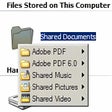
Access any program quickly with a handy context menu

File verification and repair tool
An enhancement of the Send To system menu

Monitor Hard Drive Temperatures with DiskAlarm
Optimize Your PC with PCSuite Booster

Streamline Your Messaging with Exomod SMS

Manage your Kindle notes