




0.5
Free
Screen Capture Lite
A free program for mac, by Boniten Inc.


Safe & trusted downloads
The best software, verified by experts

Professional-grade tool for precise screen recording
LensFlowPro is a free utility app that offers a clean and efficient way to handle screen recording. It prioritizes high-quality video output, allowing you to produce professional results for video documentation tasks, such as software demos or educational walkthroughs. It integrates smoothly into your existing workflow without a steep learning curve or complex setup.
Instead of cluttering your process with unnecessary plug-ins, LensFlowPro keeps things simple and lightweight. It is designed for those who need to record tutorials or meetings with minimal system impact and maximum clarity. This app shares a similar functionality to Monosnap.
LensFlowPro serves as a versatile hub for all your desktop recording needs, allowing you to capture exactly what is on your screen. You can choose to record the entire display or focus on a specific application window to keep your content clean. This flexibility is perfect for creating focused tutorials where you want to hide messy backgrounds or private notifications from your final video export.
The app excels by offering pixel-level accuracy when selecting custom recording areas, ensuring your frame is always perfectly composed. You can also capture system audio directly without the need for frustrating third-party drivers or complex loopback setups. This native integration enables easy balancing of internal sounds with external microphone input, allowing you to record separate audio tracks for greater control during the editing process.
Adding a human touch is easy with the customizable camera overlay, which allows you to place yourself directly into the frame. You can adjust the shape and border of your camera feed or use the smart camera feature for cinematic movements during export. While these features help create a polished video, the app does not include any integrated annotation or live markup tools for highlighting specific on-screen elements.
Overall, LensFlowPro offers a reliable environment for those who need a smooth, efficient workflow for high-quality screen captures. It is a practical tool for content creators or remote professionals who need to record professional-looking tutorials and demos daily without a complex setup. While it lacks built-in annotation features, the utility strikes a sensible balance between professional-grade audio control and a straightforward recording process.
Efficient Screen Capture Tool for Mac

Efficient Screen Capture Tool for Mac
A seamless screenshot tool for macOS
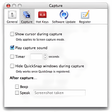
The best way to take screenshots on Mac OS X

Manage all of your screenshots
A Screen Capturing Tool With Features Galore

Extract frames from videos

Make anything full screen