

Translate WordPress with GTranslate for WordPress
Translate your WordPress site for free
- Free
- 5(1)
- 24
- V 2.9.1
Translate your WordPress site for free
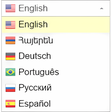
GTranslate is a WordPress plugin that can automatically translate all the content on your WordPress website. With its help, you can reach people around the world, even if they don’t speak your language. Once you install the GTranslate free plugin, anyone who visits your site can read the text in the language of their choice. Considering that the plugin offers support for 103 languages, your visitors will not be disappointed.
While GTranslate offerings are commendable, they are limited. The plugin doesn’t use artificial intelligence, which means that the text that gets translated isn’t always accurate. However, if you opt for the plugin’s premium version, you can resolve this problem by manually making the required edits. Regardless, having the free translation plugin is much better than nothing. In case you want to update your site using other free plugins, you should check out WP Contact Form, Yoast SEO WordPress, and WP Rocket.
What is GTranslate?
The GTranslate plugin has been translating content since 2008 and has been the leader in the industry in removing language barriers. It offers support for 103 languages, which means that it makes websites accessible to over 99% of internet users. Developed by Google, GTranslate plugin for WordPress uses cloud-support to translate websites, makes sites available on Google Search, and does everything automatically.
What are the features of the GTranslate plugin?
One of the best things about the GTranslate free plugin for WordPress is that it translates the content on our website automatically. It works on all pages, posts, categories, menus, widgets, tags, and more. It integrates with Google Analytics and offers right to left language support. It also offers a live chat feature so users can connect with the customer support team for any questions.
Is the GTranslate free plugin any good?
The GTranslate free plugin for WordPress is a great solution for anyone who wishes to reach out to people around the world. It removes the language barrier from WordPress sites and takes on paid translation solutions quite well. Once you install the GTranslate plugin on your website, it will automatically translate the content, posts, pages, menus, widgets, and more.
Pros
- Free to download and use
- Supports 103 languages
- Is easy to install and activate
- Works automatically
Cons
- The translation isn’t always accurate
Also available in other platforms
Translate WordPress with GTranslate for WordPress
- Free
- 5(1)
- 24
- V 2.9.1
Top downloads

Language Switcher for Transposh
Comprehensive Language Switcher for Transposh

AI Engine
Transform Your WordPress Site with AI Engine

Prismatic
Versatile Syntax Highlighter for WordPress

Advanced Google Translate
Effortless Multilingual Support for WordPress

WPML String Translation Importer
Efficient Multilingual Management for WordPress
Discover more programs

Starbox – the Author Box for Humans
- 4.5
- Free
A free app for WordPress, by Squirrly UK.

User Avatar
- 4.7
- Free
A free program for WordPress, by ctltwp.

Remove Category URL
- 4.4
- Free
Streamline Your WordPress Permalink Structure

DB Robots.txt
- 4
- Free
Optimize Your SEO Efforts with DB Robots.txt

Cudazi Scroll to Top
- 4.9
- Free
Enhance Navigation with Cudazi Scroll to Top

Date Time Picker for Contact Form 7
- 4
- Free
Free plugin for appointments

Maps Widget for Google Maps – Google Maps Builder
- 4.3
- Free
Free Google Maps plugin

301 Redirects – Easy Redirect Manager
- 4.1
- Free
Free URL redirection plugin

Data Tables Generator by Supsystic
- 4
- Free
Comprehensive Data Table Management for WordPress

Widget Contact Form 7
- 4.9
- Free
Enhance Contact Form 7 Usability with Widget

Translate WordPress – Google Language Translator
- 4.3
- Free
A free translator for WP sites

WOOCS - WooCommerce Currency Switcher. Professional multi currency plugin. Pay in selected currency
- 4.9
- Paid
Free multiple currency selector