

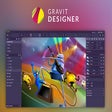
Gravit Designer for Chrome
Versatile vector design for interactive graphics
- Free
- 1(2)
- 3K
- V 3.5.49
Versatile vector design for interactive graphics
Gravit Designer, developed by Corel, is a vector graphics application created for designers, artists, and creators focused on producing interactive graphics for websites and web applications. With a focus on vector illustration and graphic design without advanced prerequisite coding skills, it is an accessible program for those new to graphic design.
Designed for simplicity and accessible use
Gravit Designer targets a broad range of creative professionals by offering a versatile vector image creation tool that suits graphic design, advertising, animation, music, architecture, and UI design. While being familiar with vector concepts is beneficial, there is a generally lowered barrier to entry for beginners and those with no prior experience. It supports input formats like SVG, PNG, or JPEG, and export files like PDF, TIFF, or SVGZ. Additionally, the interface is clean and follows a standard layout similar to many modern web-based design tools to make it easier for beginners and users transitioning from other programs.
While the program offers core vector editing features, it requires a constant internet connection and only supports RGB color mode with a limited document size of 3000x3000 pixels. Advanced features such as unlimited canvas size, version history, and support for professional file formats are locked behind a paywall.
Creative control with lowered technical complexity
An integrated library gives users access to shapes, icons, and stock photos. The program delivers functionality beyond static visuals by enabling users to build interactive graphics suitable for websites and web apps. However, there is a notable restriction on the amount of cloud storage that can be used, which can lead to performance issues when working on large or complex files. There is also a lack of support for real-time simultaneous editing by multiple users, so collaboration is limited to sharing files and independently managing versions sequentially.
Create interactive graphics and user interfaces
Gravit Designer balances versatility with focusing on being accessible for users with basic design knowledge. While the program is capable of exporting responsive designs for use on websites and web applications, its non-support for the CMYK color model possibly makes it unsuitable for professional print work.
Pros
- Suitable for users across multiple disciplines
- Requires little design experience or coding knowledge
Cons
- Limited functionality in free version
- Lacks explicit collaboration tools
Also available in other platforms
Gravit Designer for Chrome
- Free
- 1(2)
- 3K
- V 3.5.49




Discover more programs

Location Guard (V3)
- 5
- Free
A free program for Chrome.

StoryTeller. Uploader for Instagram
- 4.5
- Free
StoryTeller: Uploader for Instagram
LibreOffice Impress online
- 3.3
- Free
LibreOffice Impress Online: Create and Edit Presentations Easily

Ultra Downloader for Instagram
- 4.7
- Free
A free program for Chrome.

AudioTTS - Simple Text to Speech Downloader
- 5
- Free
AudioTTS - Simple Text to Speech Downloader

TimeZone Shifter
- 4.6
- Free
Efficient Time Conversion with TimeZone Shifter

PolyLens — AI Bias Checker
- 4.2
- Free
Comprehensive AI Bias Analysis Tool

tells — read what people don't say
- 4.6
- Free
Insightful AI Tool for Message Analysis

Angular Component Finder
- 4.7
- Free
Efficient Tool for Inspecting Angular Components

Swift Soft Transcriber
- 4.5
- Free
Swift Soft Transcriber: Real-time Meeting Transcription

AI Closer for DriveCentric
- 4.7
- Free
Streamline Sales Replies with AI Closer