
5
Free
Photo Curves - Color Grading
Photo Curves - A Quick and Easy Way to Get Great Results


Safe & trusted downloads
The best software, verified by experts
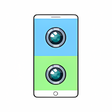
Double Side Camera - Simultaneously Use Front and Rear Cameras
Double Side Camera is a free Android app developed by BG Studio that allows users to take photos or record videos using the front and rear camera of the phone at the same time. This feature-rich app is ideal for those who love to capture both sides of the story simultaneously.
With four basic camera layouts to choose from, users can easily switch between front and rear cameras. The app also offers the flexibility to drag the camera layout to change its position, giving users the freedom to capture the perfect shot.
However, it is important to note that some devices may not support the simultaneous use of the front and rear cameras, as prohibited by the manufacturer. Therefore, it is not guaranteed to work on all devices.
Overall, Double Side Camera is a handy app for photography enthusiasts who want to experiment with simultaneous camera usage and capture unique perspectives in their photos and videos.

AI-powered photo editing software

A powerful free tool for video professionals

Advanced camera controls for mobile photography

Trendy presets for editing photos and videos

AI-powered enhancements and flawless retouching
Free
Photo Curves - A Quick and Easy Way to Get Great Results
Free
A free app for Android, by K-One Mobile.

Free
App for taking and editing photos
Free
Latest generation Android camera and gallery app

Free
One-tap photo editing app for portraits

Free
Edit photos and videos creatively

A free app for Android, by Cam Tech Studio.
A free program for Android, by Insane Solutions.

Include Bengali quotes for more inspirational photos

Transform Your Smartphone into a 4K Camera

A free app for Android, by Cool Launcher App Team.
A free program for Android, by Prashi Info.

Transform Your Photos with Body Lab

Transform Your Photos with BabyMe

Streamline Your Image Editing with Pixova

Transform Your Photos with Anime Gen: AI Art Editor

Transform Your Photos with VidShape Editor