4.3
Free
CLCL
CLCL: Efficient Clipboard Manager for Windows


Safe & trusted downloads
The best software, verified by experts

Secure local clipboard manager
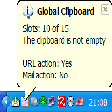
ClipSafe is a free utility software built to help you keep track of everything you copy on your Windows computer. Instead of losing a snippet of text every time you copy something new, this clipboard manager creates a local history of your links, files, and text blocks.
With ClipSafe, your privacy comes first, as the app stores all data on your hard drive rather than a remote server. Since it avoids cloud syncing and ads, it stays lightweight and fast. It runs quietly in the background, so you can easily access it when you need to retrieve an old clip.
ClipSafe acts as a central hub where you can view every item you have copied during your work session. By monitoring your background activity, this tool ensures that you have a searchable record of your data at all times. Since it logs which application or window a clip came from, you can easily trace a specific line of text back to its original source document.
The search and filter functions are particularly useful when you need to find a specific file path or URL among dozens of entries. You can sort history by type, which saves a lot of time if you copy different kinds of media throughout the day. Since the software is lightweight, it won't slow down your PC, even if you keep it running for several hours while multitasking.
Managing your data is also quite simple, as you can delete specific entries or wipe the entire history with a single click. This level of control is great for security, though you should keep in mind that the app lacks cloud features. However, your saved clipboard history stays strictly on one computer and won't sync across your other devices if you move between workstations.
ClipSafe does exactly what it promises by keeping your copy history organized and easy to search. It is an excellent fit for office workers or researchers who need to recall information without the risk of data leaks. While some users might miss having cloud access, this software is a dependable choice for anyone who values a private and local way to handle their data.

Install various packages

A free app for Windows, by WereDev

Enhance Filipino Typing with Buhid Baybayin QWERTY

A free app for Windows, by MiTeC

Jellyamp: A Music Player for Jellyfin Servers

Install the latest driver for HP pavilion dv3500 for windows 7
A free app for Windows, by mirinsoft

Manage startup apps for a faster Windows login

A free app for Windows, by jaBuT Backup

Seamless Integration with SAP BTP Resources

Install the latest driver for HP toucHPad