4.9
Trial version
CrossClip
Cross platform clipboard sharing


Safe & trusted downloads
The best software, verified by experts
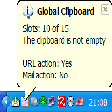
The program saves all the information that is copied to the clipboard. Therefore, you can restore any data used during your work. A flexible interface and convenient viewing make it possible to receive all the information on each data fragment.
The Global Clipboard manager allows filling in forms easily, because it keeps a list of necessary information that is always visible. Now you can see the number of strings, words and symbols of the copied text, and also the sizes of images or screenshots. With this program, you can use the clipboard to merge texts copied from different applications.
During the next work session all the contents of the clipboard and all data fragments will be restored, so that you could continue the work quickly. You can change the case of the text and transform images in the clipboard by pressing a hotkey. To write a message or open a link, now you should just copy the address, and the Global Clipboard manager will launch the necessary application itself.
The large number of parameters will allow you to customize the program in order to increase the productivity to a considerable extent and simplify the work. The program has a multilingual interface that will allow you to use your native language when you work with it.

A quiet tool with powerful impact

Runtime library for Microsoft Visual Studio

A tool for configuring your ROG setup

Unlock iOS devices

Comprehensive Image Editing with ImageMagick Q8
An MP3-based countdown timer for PC devices

Save time when completing Windows dialogs
ACRobot: A Versatile Utility Tool for Windows
Shows your system information on the desktop

Tweaks Windows scheduled tasks in an easy and safe way

Android11React: A React-Based Android Recreation

Crack locked iOS devices