


WP Edit for WordPress
Enhance Your WordPress Editing Experience with WP Edit
- Free
- 4.9
- 1
- V 4.0.4
Enhance Your WordPress Editing Experience with WP Edit
WP Edit is a powerful WordPress plugin designed to extend the functionality of the default editor. This free tool allows users to customize their editing experience with a variety of additional buttons and formatting options. With features such as drag-and-drop button arrangement, users can easily tailor the editor to their workflow, making content creation more efficient. The plugin supports multimedia integration, allowing for seamless embedding of images, videos, and other media types without the need for HTML or CSS knowledge.
The plugin includes a new Custom Buttons API, enabling other developers to integrate their buttons into WP Edit, further enhancing its capabilities. Users can access shortcodes, create tables, and highlight posts based on their status. While the free version offers significant features, upgrading to WP Edit Pro unlocks even more advanced functionalities, including custom widget creation and user role management. Overall, WP Edit is an essential tool for anyone looking to optimize their WordPress content editing.
WP Edit for WordPress
- Free
- 4.9
- 1
- V 4.0.4
Top downloads

Vectr 8211 Embedded Graphics Editor
Vectr: A Versatile Graphics Editor for WordPress

GenerateBlocks
Versatile Document Management with GenerateBlocks

Simple User Meta Editor
Efficient User Meta Management for WordPress

Gutenberg Blocks 8211 Unlimited blocks For Gutenberg
Enhance Your WordPress Site with Unlimited Blocks

Front-end Editor
Streamline Content Management with Front-end Editor
Discover more programs
GenerateBlocks
- 4.3
- Free
Versatile Document Management with GenerateBlocks

Toggle wpautop
- 4.6
- Free
Toggle wpautop: Streamlining Content Management

Osom Blocks 8211 Custom Post Type listing block
- 4.1
- Free
Efficient Custom Post Type Management for WordPress
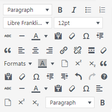
Manage TinyMCE Editor
- 4.9
- Free
Enhance Your WordPress Editing with TinyMCE

Nova Blocks by Pixelgrade
- 4
- Free
Enhance Your WordPress Site with Nova Blocks

FV Clone Screen Options
- 4.2
- Free
Streamline User Management with FV Clone Screen Options

Who Stole the Text Justify Button
- 4.9
- Free
Restore Justification with This WordPress Plugin

WordPress.com Editing Toolkit
- 4.9
- Free
Enhance Your WordPress Editing Experience

Supreme Google Webfonts
- 4.5
- Free
Enhance Your WordPress Fonts with Supreme Google Webfonts