





3.9
Free
PicPick Portable
Comprehensive Screen Capture Tool for Windows


Safe & trusted downloads
The best software, verified by experts

WinSnap Portable Edition is a special edition of WinSnap designed to run it from a removable media (USB flash drive, iPod/MP3 player, network share, etc). Simply extract the content of one of the program archive onto your portable device and you're ready to go.
Usually the standard version of WinSnap also does not require installation instead of creating shortcuts (the setup program additionally checks compatibility and already installed versions, allows to choose directory and components to install). But the standard version uses Windows registry to store their settings... and therefore it is not fully portable! The Portable Edition stores all settings into the same folder as the main executable. This allows you to copy & move your settings with the application folder.
Also, the default Auto-Save folder does not depend on drive letter. It is very useful if you are running it from a USB stick on different computers (from different drive letters, actually). So you can make screenshots and automatically save them in the same location on your portable device.
Free
Comprehensive Screen Capture Tool for Windows

Trial version
Simple screenshot utility

Free
Efficient Screen Capture Tool for Windows

Free
A compact tool for screen recording

Free
Practical tool to take screen snapshots

Free
All-in-one screen recorder and video editor
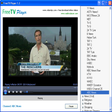
A wide variety of TV channels from your desktop

Enjoy watching digital TV programs on your PC
Capture video from any device

The simplest screenshot utility

Efficient Screen Capture Tool for Windows

TVFox: Enhance Your Browsing Experience

Fast Desktop Recorder is a freeware screen video recorder tool that allows you to easily record screen activities

Capture images with text areas and transfer them to TXT

ST Screen Recorder: Free Windows Screen Recorder

Russia TV - Bring Russian TV to your computer!
Capture Frames Efficiently: Video Snapshot Wizard