




4.6
Free
Themes Launcher: WallsIcons
All-in-one Android theme launcher with icons and wallpapers


Safe & trusted downloads
The best software, verified by experts
<h2>Theme packs and widgets for Android home screens</h2>
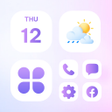
Themedy: Widgets & Wallpapers, developed by Neli Creative, is an Android personalization app that supplies cohesive themes for home-screen restyling. It bundles HD wallpapers, an icon changer with DIY editing, and widgets for clock, battery, calendar, and photos, and offers one-tap setup to apply full packs. The library spans thousands of themed packs across styles like Kawaii, Anime, Minimalist, and K-pop, updated regularly with seasonal additions. It targets Android users who want coordinated aesthetics and DIY icon control without deep technical setup.
Themedy applies matched visuals across wallpaper, icons, and widgets to produce a unified appearance. The app supplies HD wallpapers and themed icon packs bundled into cohesive packs, and includes functional widgets such as battery meters, digital and analog clocks, calendars, weather displays, and photo widgets that place gallery images on the home screen. Theme categories listed in the app include Kawaii, Anime, Minimalist, Pastel, and K-pop.
Themedy exposes a built-in icon changer with DIY tools that let users edit shapes, colors, transparency, fonts, and labels for individual icons. Widget controls let users place and resize battery, clock, calendar, and weather modules, and photo widgets display chosen gallery images. The developer positions these tools for people who prefer hands-on visual tweaking rather than external graphic editors.
Themedy emphasizes speed of application through a one-tap setup that applies a theme's visual components together. A large searchable library of thousands of packs and an interface designed for rapid browsing let trend-focused users sample multiple looks quickly. Regular content updates add seasonal and trending styles so users can swap looks frequently without rebuilding layouts from scratch.
User feedback and the app description note that the experience includes advertisements and that higher-quality assets sometimes require unlocking. The package states a minimum of Android 5.0, and the developer notes specific compatibility can vary by device model. Users relying on third-party launchers should confirm how icon packs behave, since launcher support affects whether custom icons apply consistently.
Themedy fits users who refresh their home screens often and who accept an ad-present app with some locked assets, because reviews and the app listing note advertisements and asset gating. Consider previewing and applying one or two packs first to confirm how icons behave on your device and launcher. In practice, this approach reduces the chance of inconsistent icon or widget behavior across home-screen setups.
Free
All-in-one Android theme launcher with icons and wallpapers

Free
Customize Your Home Screen with Stamp Pack: Message
Free
Transform Your Phone with Wow Water Theme

Free
Enhance Your Photos with StickersCraftLauncher

Free
DIY Wallpaper app for custom Android themes
Free
Wow Gradient Violet Icon Pack - A Fresh and Stylish Theme for Your Android Phone