





2.3
Free
Pillow Chase Home App
Personalize Your Device with Pillow Chase Home App


Safe & trusted downloads
The best software, verified by experts
<h2>Privacy-focused Android launcher with integrated gallery</h2>
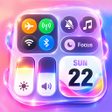
Theme Homescreen, from HIGAME GLOBAL, is an Android launcher that replaces the stock home screen to provide organized layout and local media handling. The app combines a customizable launcher interface with an integrated gallery that processes photos and videos on-device and uses system-level permission dialogs. Its main differentiator is local-only media processing and transparent permissions. The target user is an Android owner who values on-device privacy and clearer daily navigation.
Theme Homescreen replaces the default home experience with a single app that embeds media viewing and local processing, so photos and videos remain on the device rather than being uploaded elsewhere. The developer highlights transparent permission flows that rely on system dialogs. This design frames the app as a privacy-first personalization tool for people who prefer on-device control over cloud sync.
Users can group apps and adjust screen layouts through folder management and flexible grid choices, and the launcher supports custom widgets such as clocks and calendars. Gesture controls let users bind swipes and taps to actions, and the app drawer includes an integrated search for fast retrieval. Those elements together target users who want more control over how apps and widgets are arranged.
The application operates as a persistent home-screen process when set as the default launcher, and memory or CPU figures are not published. The interface is described as clean and responsive and optimized for one-handed daily use, implying modest runtime demands for typical phones. Privacy protections are explicit: media is processed locally and permission requests surface through platform confirmations rather than hidden access.
Setup follows normal Android installation steps and the launcher can be assigned as the default via system prompts. It requests access to installed apps and media through system-level confirmations, and specific version requirements vary by device. The app is distributed through the Google Play Store for modern Android releases, so behavior and available features can differ across models and builds.
Theme Homescreen is a pragmatic option for Android users who prioritize on-device control and clearer daily navigation, given the developer's emphasis on local media processing and transparent permissions. Because specific version requirements differ by device, verify how it behaves on your handset before switching launchers. Testing the app briefly as a secondary home screen is a sensible precaution prior to making it persistent.
Free
Personalize Your Device with Pillow Chase Home App

Free
Customize Your Android Experience with City On Fire Home App
Free
Transform Your Home Screen with Artful Walls Launcher
Free
iPhone 13 Theme Launcher for iPhone 13 Pro: A Review
Free
A free program for Android, by Stunning Theme.

Free
Innovative Launcher with Unique Features