
3
Free
CookieManager - Cookie Editor
Extension to Manage Cookies Related to the Current Tab


Safe & trusted downloads
The best software, verified by experts
Google Chrome Extension - SuperSub
SuperSub is a Google Chrome extension that allows you to input superscripts, subscripts, and other scientific and mathematical symbols directly into Google Sheets and/or Google Forms. It is useful for students and teachers who create Excel tables and charts. Superscripts, Subscripts, and other mathematical symbols are more challenging to type.
If you want to type in a superscript, subscript, or other mathematical symbols, a popup window will appear to guide you. These symbols are usually used in biology, math, physics, chemistry, and other fields. In addition, you can use these symbols for scientific literature.
The key feature of this tool is that you can type any scientific and mathematical symbols directly into Google Sheets or Google Forms. You can use these symbols for tables and charts.

Explore a fun plug-in

Desktop video editing made accessible and efficient

Efficient HTTP Header Management with Netmirror Extension

A free app for Chrome, by Zoomcorder.com.

Epson L380 printer troubleshooter
Free
Extension to Manage Cookies Related to the Current Tab
Free
Desktop video editing made accessible and efficient

Free
Simple assistance for CAPTCHA challenges

Free
What Is an IE Tab Helper?
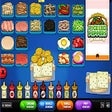
A free program for Chrome, by FunWithGame.

Cursors for Brawl Stars Fans
Autocomplete On! - Stop Pages from Disabling Autocomplete

Streamline Your Job Search on LinkedIn

Enhance Meetings with LivePrompt AI Assistant

Effortless Cookie Management with Let's Cookie!

Effortless Font Inspection with PeekFont
Cookie Downloader: Efficient Session Parameter Downloader for Chrome

A free app for Chrome.

Effortless JWT Token Management for Trae.ai

YTBlock - Enjoy Youtube without Ads

Dotb - Automatize your Dressing