





3.9
Free
X Lossless Decoder
Efficient Audio Decoding with X Lossless Decoder


Safe & trusted downloads
The best software, verified by experts
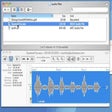
When you select an audio file in the Mac Finder, Snapper immediately appears right beneath the current window, showing you the wave form. Hit the space bar or double-click in the wave form to play. Or use auto-play to start playing the moment you select the file. Vari-speed is available too.
In the Snapper wave form you can select a part of the sound file and:
Free
Efficient Audio Decoding with X Lossless Decoder

Free
Comprehensive Photography Tool for Mac Users

Free
Audio routing solution for Mac

Trial version
A tool for altering audio tracks

Free
Free BPM Analysis for Musicians and Music Lovers

Trial version
Accelerate web design and development

Encode your MP3s easily

CoverFlow: A Multimedia Experience for Mac

MP3 Normalizer for MAC improves quality of MP3 music by levelling volume of tracks and its parts to optimal sound quality.

FrameByFrame: A Free Multimedia Tool for Mac

Feature-rich voice recorder for Mac

40MB of drum and synth loops for GarageBand
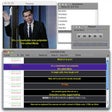
All-in-one solution for video subtitling and translation management

Record and edit digital audio

Clean-up your iTunes collection