




4.5
Free
Serta Remote
Serta Remote: Control Your Bed with Your Smart Device


Safe & trusted downloads
The best software, verified by experts
<h2>Smart AC Remote Easy Control turns Android phones into AC remotes</h2>
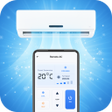
Smart AC Remote Easy Control, by Hong Kong Lux Limo Service Limited, converts an Android smartphone into a universal air-conditioner remote to replace lost or bulky controllers. The app sends Infrared (IR) signals from a phone to adjust temperature, change operation modes, set fan speeds, toggle power and save multiple device profiles. It includes a large IR code database and a simplified setup, aimed at homeowners, renters, and office users who want consolidated AC control.
For users managing several indoor units, the app centralizes essential controls on a single device. Core controls include power toggles, mode switching, temperature changes, fan speed selection, and swing adjustment. The app also lets users save multiple remote profiles so different rooms or units retain their preferred settings, which reduces the need to hunt for separate remotes during daily use.
The app transmits commands via a smartphone IR blaster, so device hardware determines reach and signal reliability. The developer supplies an extensive IR code database to match many manufacturers, and the app exposes Auto-Scan or Universal options to locate compatible signal sets. Users should expect compatibility to vary by phone and AC model because the correct IR configuration is required for reliable control.
The setup process emphasizes quick pairing: the interface places common controls up front and provides an Auto-Scan path to find matching codes without manual entry. Saved configurations persist across sessions, which simplifies switching between multiple units. User feedback notes the app’s ease of use for people who simply need a working replacement when an original remote is missing.
User reception describes the app as a helpful utility, while reporting that real-world performance depends on phone compatibility. The app may display advertisements to support development, so users may encounter ads during use. Core operation focuses on sending IR signals from the device rather than cloud-based device control, so routine reliability ties back to physical signal matching between phone and AC.
The app is a practical option for homeowners, renters, and office users who want to replace or consolidate physical remotes into phone-based control. A clear limitation is reliance on a device with an IR blaster, so users without that hardware cannot use the main functions. For users who already own an IR-equipped phone, the app fits well into daily routines that prefer a single saved control panel for multiple AC units.
Free
Serta Remote: Control Your Bed with Your Smart Device

Free
Macroled: A Remote Control App for Smart Products
Free
Electra AC Remote Simple 0-set
Free
RGB LED Remote: All-in-One LED Light Controller
Free
Remote for LED Lights Controller

Free
Home Remote Controller App