

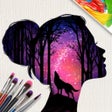
Silhouette Art for iPhone
Relaxing silhouette art app for short mobile creative sessions
- Free
- 4.5
- 3
- V 2.0.0
Relaxing silhouette art app for short mobile creative sessions
Silhouette Art, from Lion Studios, is a mobile creative simulation that helps casual players produce polished silhouette artworks with simple tap-and-swipe controls. Players layer colors, patterns and decorative stickers, then remove a mask to reveal a clean silhouette composition. The app offers extensive customization options, glitter effects and ASMR-style audio feedback to enhance relaxation. It targets casual mobile gamers and anyone seeking a short, low-effort creative activity on iPhone devices.
A guided, no-drawing creative sim that emphasizes polished results
In this game, you work from templates rather than freehand drawing, so output depends on selection and placement instead of artistic skill. The developer markets the experience as "Zero-Skill Art," which matches the gated, step-by-step flow: choose a template, apply fills and decorations, then finish with the reveal. That design makes the app accessible to players of varied ability, including children and adults who want immediate-looking results.
Level progression and studio management give structure to short sessions
Inside the studio, progression unfolds through a library of unique images and a simple unlock system that encourages repeat plays. Players run a virtual studio and collect completed pieces as part of advancement. Themes include:
- romantic landscapes
- animal and nature scenes
- fantasy illustrations
Polished visuals and sensory feedback prioritize relaxation
On each screen the app emphasizes visual polish and sound cues designed to calm the player, with glitter effects, patterned fills and soft audio feedback described as ASMR-like. The package requires a relatively modern OS and occupies roughly 500 MB of storage, so it fits current iPhone hardware but not very old devices. Age ratings place it at about 12+ or 13+ because of mild themes.
Replay value is driven by variety, with a trade-off in ad frequency
When replayability matters, the app relies on a wide set of templates and collectible studio output to keep players returning. The experience supports offline play for creative sessions without connectivity. However, user feedback notes a high frequency of advertisements between levels and the presence of optional in-app purchases, which affects pacing for players who prefer uninterrupted runs.
Best for quick, casual creative breaks rather than deep art work
The game is a suitable pick for players who want short, visually satisfying creative sessions on a mobile device and prefer guided output over manual editing. Those seeking advanced editing tools or a deep creative toolkit should expect limitations. For casual relaxation and easy shareable pieces, the app offers a dependable, low-commitment experience that rewards brief repeat plays.
Pros
- Templates produce polished silhouettes without drawing skill
- Hundreds of themed images and collectible studio output
- ASMR-style audio and visual feedback for relaxation
- Supports offline play for untethered sessions
Cons
- Frequent in-app advertisements between levels
- Limited advanced editing controls for experienced artists
- Requires roughly 500 MB of storage space
Also available in other platforms
Silhouette Art for iPhone
- Free
- 4.5
- 3
- V 2.0.0


Discover more programs
Tap Busters: Bounty Hunters
- 4.6
- Free
Tap Bubble World - Become the Ultimate Champion of the Leaderboards

Connect the dots : Dot to dot
- 4.9
- Free
Connect the Dots: Dot to Dot - A Relaxing Puzzle Game
Scary Evil Creepy Teacher 3D
- 4.5
- Free
Scary Evil Creepy Teacher 3D for iphone from Imran Aslam

Short Life Pro
- 5
- Free
Short Life Pro for iphone from Peter Kaspar
Bear Party: Fall Down IO
- 4.8
- Free
Bear Party Puzzle Survival Game

Pingo Park: Merge Penguins
- 4.2
- Free
Pingo Park: Merge Penguins - The Best Game For Kids and Their Parents
Gin Rummy
- 4.3
- Free
A free app for iPhone, by Ironjaw Studios Private Limited.

Spot the Differences
- 4.5
- Free
Spot the Differences

ChatLinx Otome Text Story Game
- 4.9
- Free
ChatLinx Otome Text Story Game for iphone