




2.5
Trial version
FastPaste
Paste text with a hotkey through clipboard


Safe & trusted downloads
The best software, verified by experts
Insert predefined text on any application
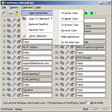
QuickTextPaste is a free utility tool for PC made by SoftwareOK. This program enables users to quickly paste text into any application they want using a keyboard shortcut that they can set. There is no character limit in place and supports entries with multiple line breaks in them.
QuickTextPaste essentially works the same way as clipboard tools like ClipX and Clipboard Master does. In addition to providing standard clipboard functionalities, however, it also lets users conveniently add pre-defined text of their own, making this tool more versatile and flexible for various purposes.
First and foremost, QuickTextPaste is a portable tool so you don't need to install it and you can use it right away after opening it. On top of being able to add custom text, you can also set pre-defined commands based on certain conditions. It already comes with pre-built entries that you can test and experiment with to get used to it. Once you get the hang of it, you can start adding your own into its database.
Type in your text and select a modifier and keypress combo. You can also enable a menu text to display if a shortcut key is used already. For commands, you have run for a new program, cpy to copy text and start a new program, and img for loading and pasting an image. Additionally, you have charmap to bring up a character map and %pptxt% to paste text from your clipboard to the foreground application.
To edit an existing entry, click on the detach icon so a new window will pop up where you can start modifying, making it a simple and faster process. There will be a slight learning curve for new users given the options and functionalities on offer, but learning them all will be relatively quick and easy all things considered.
For such a small and portable program, QuickTextPaste packs in a lot of options and functionalities for various applications. It's free, offers plenty of versatility and flexibility, and it's relatively easy to learn and use. If you're looking for something with more than just simple clipboard features, give this one a try.
Trial version
Paste text with a hotkey through clipboard

Free
A handy neverending Clipboard
Free
Hardware identification tool for PC

Free
Simple file hashing built into file management

Free
Copy up to 25 clips to the clipboard

Free
Quick access to your frequently used folders

Free formatting utility for Windows

System analyzer and diagnostics tool for PC

Smooth connectivity made simple

Locked file remover utility

Access iCloud data from your PCs for free

Efficient Management of WSL Distributions
Efficient Oracle DUMP File Viewer for Windows
High-Performance Code Formatter for JavaScript
Comprehensive Accelerator for Gaming and Streaming
Streamline Employee Insights with Omnissa Workspace ONE
Efficient Podcast Management with PodcastTUI