ProShutdown for Mac
- Free
- 4.2
- 584
- V 1.1
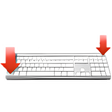
Mac OS X has a nifty shortcut - Ctrl+Eject - for shutting down your computer. On older Apple keyboards, these keys are on opposite diagonal corners of the keyboard, and at the end of the day you can simply hit the two corners of the keyboard then Return to switch off your computer. However, with the new Apple Aluminium Keyboard, the eject key in in the middle of the top row of keys - hardly as convenient! Instead, F19 takes the top right spot.
ProShutdown is a free program that restores the "opposite corners" shortcut by listening for Ctrl+F19, and displaying a shut down dialog when these are pressed. It displays a small "F19" icon in the menu bar to remind you that this shortcut is available. Want it gone? Press Ctrl+F18 to hide (or bring back) the icon.
ProShutdown for Mac
- Free
- 4.2
- 584
- V 1.1