





3.6
Free
WLAN Optimizer
Make WLAN connections even better with the WLAN Optimizer


Safe & trusted downloads
The best software, verified by experts
Simple Internet Connection Boosting App
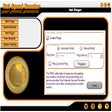
Net Speed Booster is a free internet and network program that allows you to increase the Internet speed of your PC. Whether your connection is through dial-up, ADSL, Cable, LAN, or Wi-Fi, this app supports it and boosts the performance capabilities of your network speed. It works by keeping your connection secure, preventing spontaneous disconnections and increasing the speed of your modem.
The most common problem in internet connections is the fluctuations you’ll experience now and then—whether it’s by sudden disconnections or extremely slow loading. Oftentimes, the problem lies in the connection itself. Maybe you’re overloading your connection with traffic that’s a bit beyond what it can handle, or there’s something else interrupting it. Whatever the case, it can be highly frustrating, especially when you’re in the middle of something that requires constant internet connection, such as downloading, streaming, or using social media. Luckily there are lots of programs created to solve this problem. Some of them are specific, like apps optimizing online game speed or detecting anyone leeching off your bandwidth, while some are general and all-around apps made to address various problems with your connection speed. Net Speed Booster falls into this category and offers three main tools to deal with your speed problems: Speed Booster, Net Pinger, and RAM Booster.
Unlike most apps of this kind, Net Speed Booster doesn’t need your manual input. You only need to install it, and then it will automatically run without the need to put in any user information or whatnot. It also automatically adjusts the settings of the computer to create the best possible connection results. Usually, it will connect you to the closest or strongest connection available to you, especially for the Wi-Fi option. This will then prevent you from having slow internet speed that’s prone to interruptions. The app modifies the framework of the connection and communication with the web, so you don’t have to be an expert on this thing to work with the program. However, you’re still allowed some control over what happens. You can manually switch to manage the data connection, Wi-Fi state, and Airplane Mode if you can’t manually configure the system settings. What’s great about Net Speed Booster is that it’s pretty lightweight and hardly bogs down your system resources. You can just sit back and relax while it does its thing.
For a small app, Net Speed Booster is considerably hardworking and is great for people who not used to messing around with their internet connection. However, it’s a bit too simple with its features and would sometimes display advertisements while in use. This is the kind of program meant for users who just want something hassle-free. If you’re looking for something more advanced, though, then you better try other apps.
Free
Make WLAN connections even better with the WLAN Optimizer

Free
Freemium bandwidth tester

Trial version
Handy tool to analyze wireless networks

Trial version
Control the traffic of your local network

Free
Share files from your PC

Free
FileFinder is a really fast and easy to use file search utility.
UltraVNC: VNC remote desktop tool

Take full advantage of your Canon printer and scanner

A powerful and versatile web debugging proxy

HTTP web server manager

Open-source network manager for PC
Unraveling Splunk: Navigating the world of data insight

Download and convert music from Tidal

Local area network scanner for PC

Download from popular video streaming sites

VNC Connect: Subscription-based Remote Desktop for multiple platforms