




4.1
Free
Default Programs Editor
Manage Your Default Programs Easily


Safe & trusted downloads
The best software, verified by experts

Efficient Launching with Microsoft Speed Launch
Microsoft Speed Launch is a free utility designed for Windows users, enhancing the efficiency of application and file launching. This tool allows users to quickly access frequently used programs and documents, streamlining workflows and minimizing time spent navigating through menus. Its simple interface ensures that users can easily customize their launch settings and organize shortcuts according to their preferences.
The application stands out for its user-friendly approach, making it accessible for users of all skill levels. With features that allow for quick launching through customizable hotkeys and a straightforward setup process, Microsoft Speed Launch effectively reduces the clutter on the desktop. This utility is an excellent choice for those looking to improve their productivity by simplifying the way they access their most-used tools.
Free
Manage Your Default Programs Easily

Free
Types: A Free Utility Tool for Windows

Free
Want to know what is loaded on your PC when you start Windows?

Free
A simple and easy to use application designed to help you manage the way your applications launch and on which screen they a

Free
Free software to maximize PC performance

Free
Clean and repair your PC

Handy Windows Manager Tool

A free app for Windows, by Digitalmason.net.

Manage your Samsung SSD

Trimming Down System Applications

Easy-to-use utility for recording the keyboard and mouse

Download Intel® Graphics Media Accelerator Driver for Windows 7* and Windows Vista* (exe)
Efficient Update Management for Lenovo Devices

Install the latest driver for HP 3530

Keep your tabs organized with this extension
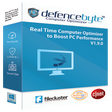
Clutterfree System
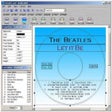
Create personalized and original covers for CDs and DVDs