





3.7
Trial version
Autostitch
Automatic image stitching


Safe & trusted downloads
The best software, verified by experts
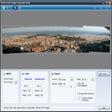
Download Microsoft Image Composite Editor for Windows
If you’ve ever taken photos at a national park, sporting event, or city skyline, you’ve probably wondered what it would look like to combine them all into a single panoramic image. With Microsoft Image Composite Editor for Windows, you don’t have to wonder anymore. You can get a free download of Microsoft Image Composite Editor for Windows and stitch your photos together into panoramas.
Beyond the ability to stitch photos together into a panorama, Microsoft Image Composite Editor for Windows offers a variety of other photo editing features and tools. Some of them might seem foreign to you if you’re unfamiliar with photo editing, or you might be a professional accustomed to these tools. Regardless of your experience level, you can develop your skills and photos and develop your understanding.
Microsoft Image Composite Editor is a powerful tool for creating stunning panoramas by stitching together multiple images or frames from videos. It uses advanced stitching algorithms to automatically align and blend source images while determining the panorama type (planar, cylindrical, or spherical). Its orientation adjustment tools allow users to fine-tune the panorama's perspective.
Key features include automatic lens vignette removal, cropping to maximize the image area, and optional completion of missing parts, such as skies or grassy areas. ICE supports various camera motions, making it versatile for different shooting styles. For high-resolution needs, it can stitch Gigapixel-scale images without size limitations and handle image sets taken on a regular grid, such as those captured with a Gigapan head.
The editor is optimized for 64-bit systems and offers flexible export options, including HD View, Deep Zoom, PNG, TIFF, JPEG, and layered Photoshop file formats. Additionally, users can publish panoramas directly to Microsoft Photosynth for sharing online.
With support for video panoramas and advanced projection techniques, ICE is a comprehensive solution for both casual users and professionals looking to create high-quality, large-scale panoramic images.
Compatibility and system requirements – What system aligns with Microsoft Image Composite Editor since it’s an older piece of software?
The system requirements for your computer will depend on the Microsoft Image Composite Editor version that you’re working with – and that makes sense since this is an older software. There are no more recent versions of the software available, so you will need to find a particular version that you prefer and stick with it. For example, if you are working with anything up to Version 1.4.4, you can use Windows XP. You can use Windows Vista, Windows 7, or Windows 8.1 for more recent versions.
No, Microsoft Image Composite Editor for Windows is not available from Microsoft 365 because the software has been discontinued. Microsoft 365 doesn't include a standalone, dedicated image editor like Photoshop, but it does offer several tools with basic image editing capabilities:
If you’re interested in a subscription to Microsoft 365, you’ll want to make sure the plan you choose includes whichever of these tools you’re interested in. Microsoft 365 offers four subscription levels to meet various needs: Personal, Family, Business, and Enterprise.
If you want to access any other productivity apps that are unavailable through Microsoft 365, you will need to download and purchase a traditional license for them.
Trial version
Automatic image stitching

Free
Unveiling Photo! Editor's secret toolbox

Trial version
Easily create attractive panoramic photos

Trial version
Basic photo organizing software free trial

Free
Photosynth: A Free Photography App for Windows

Trial version
A free image processor that can rival Photoshop
Microsoft PowerPoint Viewer 2007 for Windows: Seamless slide viewing
Streamlining Your Photography Workflow

IDPhotoStudio

Lightweight image viewer for PC

Nostalgic for the days of pen, brush and paper?

A Feature-Packed Photo Editing Software for Professionals

Enhance Your Photos with AliveColors Plugin

Efficient Photo Management with Nokia Photos

Comprehensive Overview of Microsoft Photo Info

Comprehensive Image Editing with Active Photo Editor

Explore Creative Photography with Dreamsuite