
4.8
Free
Long Exposure Camera 2
A free program for Android, by Arbel Solutions.


Safe & trusted downloads
The best software, verified by experts
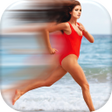
<h2>Long exposure camera: Mobile long-exposure effects without a DSLR</h2>
Long exposure camera, from Best Photo Apps, helps Android users create artistic long-exposure images without a DSLR by simulating slow shutter captures. The app captures a series of photos and merges them into a single frame to produce motion blur, light trails, and smooth water effects using software processing. It offers an uncluttered interface, adjustable exposure duration, and high-resolution export options, aimed at amateur photographers and social-media creators who want quick, creative results without mastering manual camera settings.
The app uses a software-based blending method rather than true long-exposure hardware, capturing multiple individual photos and merging them into one image. Unlike other camera apps that require native slow-shutter support, this approach lets many Android devices produce light trails and motion blur even when the device lacks a real slow shutter mode, making the effect accessible on mobile hardware.
The app saves creations in high-resolution image files and includes GIF output and built-in sharing controls, so finished photos are ready for social platforms or the device gallery. It is designed for Android, requests standard camera permissions, and receives updates to support modern OS versions, which keeps sharing and file handling aligned with typical mobile workflows.
The interface targets new users, offering a small set of controls that lower the technical barrier to long-exposure effects. What’s more, the app removes the need to manage ISO or shutter-speed settings manually, so newcomers can produce stylized motion images in a few clicks. That simplicity reduces setup time for social posts and casual experimentation.
Blending multiple frames yields distinctive creative effects such as smooth water and light streaks, though the result is a synthetic interpretation of slow-shutter photography. The app’s output prioritizes visual impact suitable for social sharing and experimentation rather than reproducing the precise tonal and highlight behavior of optical long exposures on dedicated cameras.
In conclusion, the app is a practical choice for casual creators and amateur photographers who want fast, shareable long-exposure visuals on Android; it lowers technical barriers and accelerates creative exploration. Users seeking exact optical behavior or fine-grained exposure control should use dedicated camera equipment instead. For best results, keep the device steady so static elements stay sharp while motion renders smoothly.

AI-powered photo editing software

A powerful free tool for video professionals

Advanced camera controls for mobile photography

Trendy presets for editing photos and videos

AI-powered enhancements and flawless retouching
Free
A free program for Android, by Arbel Solutions.
Free
A free program for Android, by FANTAGRAM Inc..
Free
A free app for Android, by Cariya Japan Inc..
Free
A free app for Android, by VisionFunny.

Free
Vector Camera - Real-time Effects Camera App
A free program for Android, by Destiny Media Apps.

A free program for Android, by App Basic.
A free app for Android, by Centangle Interactive.
Enhance Your Photos with Ganesh Photo Editor 2019
A free app for Android, by Suit Outfit Wear.
A free program for Android, by quovadit.

Birthday Dual Photo Frames: An App to Beautify Your Photos

A free program for Android, by Sheila C Hoover.

A free program for Android, by ITJAPPDEV.
A free app for Android, by Collection App Studio.

A free app for Android, by Card and Dialer.

A free program for Android, by PlayZone Apps.