

KitCut for iPhone
Collages that are so bad they're good
- Free
- 4.7
- 139
- V 1.0.2
Collages that are so bad they're good
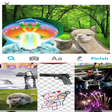
KitCut Visual Mashups is a fun image maker for iPhone. It allows you to make simple collages from images on the web and your phone, that you can share on social media and via KitCut itself. This image app is about as far from Instagram as you could get. KitCut creates loud, brash and purposefully amateurish collages.
Cut out
To get started with making a KitCut, you select a photo which can be from your own library, or you can search in the app for images online. Select one, and either use it whole or cut out a part to use in your collage. You can use as many images as you like, and when they appear on the board you can move, rotate, and resize them to get your collage just right. Double tapping an image flips it horizontally, and you can also bring images forward or back.
As well as using photos, you can draw directly onto your collage and also add text. It's all pretty simple, but not without its problems.
Create
While you can easily create fun and so-bad-it's-good collages, sometimes there are annoying limitations. One limitation is cutting out shapes with your finger. This is tricky to do accurately, as your finger obscures what you're cutting (in my case, an Alpaca). When your cutouts are on the board, sometimes resizing them is fiddly for the same reason. iPhone screens suddenly feel a little small when your collages get busy, and you can find yourself making a lot of mistakes.
Nevertheless, KitCut succeeds in making funny collages easy to make for the most part.
You can share your creation in the app, via messaging apps like WhatsApp, or on social networks like Facebook and Twitter. What you cannot do, unfortunately, is save your collage to your own camera roll. All images are watermarked with the KitCut name in the bottom left corner, and this cannot be removed.
Trashy fun
It's hard to see KitCut becoming a successful social network in its own right, but it's still a neat app for making trashy and dumb collages you can share with your friends. As long as you keep your expectations low, you won't be disappointed!
Pros
- Easy to understand
- Web search for images
- Create collages quickly
Cons
- Can be fiddly
- Watermark cannot be turned off
KitCut for iPhone
- Free
- 4.7
- 139
- V 1.0.2
Top downloads

Hypic - Photo Editor AI Art
AI-powered photo editing software

Adobe Lightroom Photo Editor
Manage and edit your photo workflows

Blackmagic Camera
Achieve cinematic quality with this videography app

Photoshop Camera Portrait Lens
A free program for iPhone, by Adobe Inc..

Adobe Lightroom for iPad
For expert-level editing on-the-go
Discover more programs

Facebook Camera
- 3.9
- Free
Overview of Facebook Camera for iPhone
Horror Cam
- 5
- Free
A free app for iPhone, by Tropisounds Corporation.

Pic Stitch - Collage Editor
- 4
- Free
Create Stunning Collages with Pic Stitch

LaterSnap
- 4.8
- Free
Send photos from your camera roll to Snapchat contacts

Funny Pics
- 4.2
- Free
Explore Hilarity with Funny Pics App

Blurtt
- 4.8
- Free
Blurtt: A Free iPhone Photography App

MyFaceWhen
- 3.8
- Paid
Capture Your Expressions with MyFaceWhen

Twitpic
- 4.6
- Free
Twitpic: Capture and Share Photos Easily

Looksy
- 4.8
- Free
Instant Live Video Chat Software for Smartphones