




4.4
Free
MidpX
MidpX: Free Utility for Windows Gaming


Safe & trusted downloads
The best software, verified by experts
Run Java games and programs on Windows
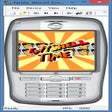
Do you want to try Java applications or games for your phone without having to install them? Well, now you can with KEmulator for Windows, which emulates mobile operating systems.
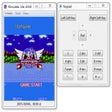
KEmulator loads JAR files and supports APIs for almost any type of J2ME program. You can even choose what mobile phone model you'll emulate. Once the application is loaded, it will open in the program’s window and you’ll be able to control it either with your own keyboard or with an on-screen one.
KEmulator’s high compatibility also includes support for several 2D and 3D graphic engines, making it possible to run even the most demanding games. If you activate the pixel interpolation you’ll be able to see graphics adapted to any size.
And last, but not least, KEmulator also has a video capture option so you can save sequences of these programs in AVI format. This complete emulator is ideal if you program or use these mobile apps.
Free
MidpX: Free Utility for Windows Gaming

Free
Play Android games on your Windows desktop

Free
A free and powerful Droid4X

Trial version
Fun action game based on the popular movie

Free
Demonstration Disc of Popular PlayStation 4 Games

Free
Free Nintendo emulator

Free RGB synchronization program
Powerful Nintendo Switch Emulator for Windows

Free expansion with enhanced content for MudRunner

Enhance your Roblox gameplay
Free Nintendo emulator

Surgery mod for Minecraft

GTA: San Andreas Liberty City Mod Review

Play Android games on your PC

EZ Game Booster: Enhance Gaming Performance
Enhance Your Retro Gaming Experience with Skraper

PCem Emulator Overview
OGAME Calculator 2006 Overview