4.4
Free
FSL Launcher
Practical program and folder launcher


Safe & trusted downloads
The best software, verified by experts
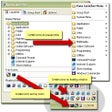
The icons can be created as floating window. With this method, when the mouse pointer is hovered above icons created by Kana Launcher on Windows system tray, a window which contains icons is displayed. From this window, you can click the icon that represents the program or document, and that particular program or document will be launched.
Other method to launch the programs or documents is by creating a Group Starts. This is a group of several programs or documents which can be launched just by using one mouse click. Group Start is created as one menu item in Kana Launcher popup menu.
To manage the icons and menus created by Kana Launcher is very easy. Kana Launcher recognizes any file added to or deleted from its data folder, so it can update the icons and menus automatically. Kana Launcher itself has capability to manage the icons and menus, although you can also use Windows Explorer to manage them.

A reliable operating system built for performance

FixWin: Essential Utilities Tool for Windows

Efficient Data Recovery Tool for Windows

PortableApps Suite: Essential Utilities for Windows

Check Your LCD Monitor's Performance Easily

Uncover System Processes with Process Revealer

Efficient Command Line Interface for Cloud Management

Efficient Command Line Tool for Fleet Management
All-in-one disk cleaner, system, memory and internet optimizer

KeeWeb: A Versatile Password Management Tool

A trial version program for Windows, by KDETOOLS SOFTWARE.

Effortless Driver Backup for Windows Users