

3.1
Free
KM Wakeup
An alarm clock for your computer


Safe & trusted downloads
The best software, verified by experts
Wake up to your own music on Windows
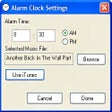
iTunes/MP3 Alarm Clock is a lightweight desktop tool that plays your favorite audio files—MP3, WAV, or iTunes tracks—as alarms. Designed for simple scheduling, it lets users assign a song and a time, with a pop-up message and sound that activates when the clock strikes.
You don’t need iTunes installed to use it. The program supports standalone music files and offers basic alarm scheduling, including repeat options. It’s ideal for users who want a no-frills alarm experience without installing full calendar suites or bloated software.
iTunes/MP3 Alarm Clock is designed for a single purpose: triggering alarms with custom audio. Users can select a local MP3, WAV file, or an iTunes track, assign a time, and write a full-screen message with an optional background color. Its small footprint and simple interface make it convenient, though the program must remain open—minimized, not closed—for alarms to function properly. It's straightforward, low-maintenance, and built for utility over visual polish.
This isn’t the kind of tool packed with smart features. There’s no snooze button, no fade-in options, and no way to control alarm volume within the app itself. What it offers is reliability: a static alarm system that rings when it should. Users can run multiple instances to set different alarms throughout the day, making it flexible in a minimalist sort of way. That said, expect a very dated interface and no built-in scheduling complexity.
While it lacks modern features, the program still holds nostalgic value for users who appreciate classic Windows tools. Its age means there’s no active development or tech support, and it may need compatibility settings on newer systems. But for users who just want a dependable, music-based alarm solution without distractions, it delivers on its promises with quiet confidence.
If you're after a lightweight, music-based alarm solution for your desktop, iTunes/MP3 Alarm Clock still gets the job done. It’s not made for users chasing modern features or sleek design—but it does offer a nostalgic, no-frills way to wake up to your favorite tracks. As long as you're willing to leave it open and overlook its outdated interface, this vintage utility remains a simple and effective choice for basic desktop alerts.
Free
An alarm clock for your computer
Free
A simple alarm clock for you

Free
Make sure you never oversleep again
Free
A free app for Windows, by Scott Moore.
Free
A free program for windows
Free
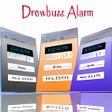
Drewbuzz Alarm: A Free Windows Utility

Time Management Made Easy with ManicTime
The first transparent desktop clock for Windows
Timer program to time different tasks
Good Timing: A Free Windows Clock Tool
Efficient Alarm Management with College Alarm Clock
Klok: A Windows Clock and Alarm Utility
Easy-to-use countdown timer
Calculate the time consumption (hours, minutes, seconds and more) of your works.
Efficient Time Management with WorkSMART
Fully customizable digital desktop timepiece
Drewbuzz Alarm: A Free Windows Utility