

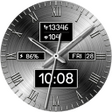
Hybrid DINGON Watch face for Android
<h2>Hybrid DINGON watch face for circular Wear OS devices</h2>
- Free
- 4.4
- 2
- V 1.0.2
<h2>Hybrid DINGON watch face for circular Wear OS devices</h2>
Hybrid DINGON Watch face, from AA1 HOLDINGS LIMITED, is a Wear OS personalization app that combines analog hands with a digital time readout to present time and glanceable metrics. It displays health and system telemetry on the main dial, supports Always-On Display, and offers wrist-based color changes via long-press. The face targets wearers of circular smartwatches who want a compact hybrid dial that shows essential fitness and battery data at a glance during daily use.
Hybrid arranges time and telemetry for quick glances
Hybrid positions analog hands over a central digital readout so users can check precise time and glance metrics without switching screens. The design targets circular displays and places completed step count, current heart rate, battery level, and date within the dial area. Compatibility requires Wear OS devices running API Level 33 or higher, a platform constraint that affects which watches can install the face.
Color customization happens directly from the wrist
Background colors change through a long-press customization menu, eliminating the need for a companion phone app. The long-press gesture opens a built-in selector to cycle background palettes, which suits quick aesthetic adjustments while wearing the device. This workflow keeps modification local to the face and avoids an external settings interface, useful for users who prefer in-watch controls over paired-phone configuration.
Health and battery readouts are integrated for glanceable tracking
Fitness and system data appear on the main dial so steps and live heart rate are visible without launching separate apps. The heart rate is shown in real time and step totals update continuously, while a battery indicator gives a quick charge estimate. Those placements prioritize glanceable information over complex complication setup, which matches the face’s goal of immediate situational awareness.
Setup and daily use require little technical skill
Installation and routine configuration are straightforward: pick the face from the device chooser and long-press to adjust color. There is no indication of a complex settings hierarchy or required developer tools, so typical users can apply the face and tailor appearance on-device. The face is optimized for recent Wear OS APIs, which reduces the chance of needing manual workarounds on supported watches.
Practical choice for Wear OS users seeking a hybrid dial
Hybrid is a practical option for Wear OS owners who want a single face that balances analog readability with glanceable fitness and battery information. Its limitation is platform scope, since it requires API Level 33 and supports only circular displays. For anyone with a compatible smartwatch who prefers wrist-based color tweaks and on-screen health metrics, Hybrid fits that use case well.
Pros
- Long-press color customization directly on the watch
- Per-dial step count and live heart rate shown on-screen
- Always-On Display support for persistent time visibility
- Designed for circular Wear OS devices and API Level 33+
Cons
- Not compatible with square or rectangular smartwatches
- Requires Wear OS API Level 33 or higher
- Limited number of public user reviews available
Hybrid DINGON Watch face for Android
- Free
- 4.4
- 2
- V 1.0.2




