

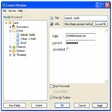
Handy Password for Windows
- Trial version
- 2.8(15)
- 5.5K
- V 4.9
What are the benefits of using Handy Password?
- It automatically saves data from web forms - passwords, logins, etc.
- It automatically fills out web forms.
- It automatically enters into sites: fills out web forms and logs in.
- It securely stores data - passwords, addresses, credit card numbers, PIN codes, etc.
- It generates crack-proof passwords
Autosave
This function allows you to save data, which you have entered into site web-forms (logins, passwords, etc.). All data saves into Handy Password file.Saving of passwords and other login information with Internet Explorer is not safe enough: anyone who works on user's PC can access to his/her Email and to all services where he/she has been registered.
Automatic login
Automatic login function allows to open your e-mail account or any other webpages protected by password with minimal efforts. So automatic login function in Handy Password saves your time and increases effectiveness of your working in the Internet.
Bookmark Manager in Handy Password: easy navigating and automatic login
What is a bookmark? When you find Web sites or pages that you like, you can save site's URL by creating a bookmark. Bookmark is placed on the top of the IE window. It allows to quickly open site or page, once clicking the bookmark. Handy Password is a bookmark manager, combined with password manager, which allows not only to bookmark favorite sites, but to login to them automatically. This is done by saving not only the site's URL, but also the form fields (for example, login username and password) by Handy password manager. Saved bookmarks are placed on the IE toolbar.
Handy Password for PC
- Trial version
- 2.8(15)
- 5.5K
- V 4.9
Top downloads

WiFi Password Decryptor
Recover forgotten WiFi passwords
Free Excel Password Recovery
A powerful tool to recover your Excel password

Free Excel Password Recovery
Efficient Tool for Excel Password Recovery

BitLocker Password
A recovery tool for encrypted drive access

Free ZIP Password Recovery
Free password recovery software for ZIP files
Discover more programs
Windows Password Cracker
- 2.9
- Trial version
Recovery solution for lost Windows passwords

ToolsGround PST Password Recovery
- 4
- Trial version
ToolsGround PST Password Recovery

Revelation
- 3.2
- Free
Unveil hidden passwords in applications and websites

Arovax Tray Safe
- 3.8
- Trial version
Save and manage your passwords
JPassGen
- 3.3
- Free
Cross application password generator
MSN Messenger Password
- 3.3
- Trial version
Forgotten your MSN password?

AsterWin IE
- 4.7
- Free
Retrieve Hidden Passwords with AsterWin IE
My Wallet
- 3.7
- Free
Keep all your passwords safe

Password Pond
- 5
- Free
Offline tool for custom password generation

QuickNet
- 4.3
- Trial version
Manage passwords more easily in IE

Multi One Password
- 4.8
- Paid
Generate unlimited passwords