




2.8
Trial version
FontMatch
Identify the font used in an image or document


Safe & trusted downloads
The best software, verified by experts
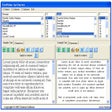
FontPicker is a free font picker and font compare tool. It offers a choice of one, two or three font columns. Each column can display a separate font, or the same font with different sizes, styles and colors.
Options include left, right and center text alignment, and bold, italic, underline and all-caps (all capital letters) font styles. The current configuration is automatically save on closing the application.
The sample text viewed in each column can be edited with normal Windows keystrokes (del or crtl-X to delete; ctrl-V to paste)
FontPicker provides a character map for each font panel. Clicking on a font character copies it to the Windows Clipboard. As well, the startard ALT numbers are shown for keyboard entry of special characters.
Trial version
Identify the font used in an image or document

Free
Explore Your Fonts with AMP Font Viewer
Free
Explore Installed Fonts with WinFontsView

Free
A free Desktop customization program for Windows

Free
Create your own text fonts

Free
Comfortably view all the fonts on your computer

Repair fonts installed on your PC effortlessly

One-click font folder reset and snapshot manager

Manage your fonts effectively
Organize your fonts thoroughly
Four utilities for text fonts on your PC
Enhance Your Windows Experience with Animated Cursors
Font manager and viewer

A free app for Windows, by dafont.
Font of useful symbols for the home or office
Create cursors and animated pointers
Font Manager with many options