





3.3
Trial version
HEIC to JPG Converter
Converter for High-Efficiency Image files


Safe & trusted downloads
The best software, verified by experts

Easy HEIC and HEIF Image Converter
FonePaw HEIC Converter is a free offline photo file converter that can open and convert HEIC images on Windows. HEIC or HEIF (or High-Efficiency Image File Format) images are mainly used by Apple devices. Therefore, any non-Apple device cannot open them without supporting apps. Here enters FonePaw HEIC Converter. This multimedia app allows you to convert these high-quality photos into other formats, such as JPEG and PNG so that you can open and view them outside of Apple devices even while offline. You just simply add those .heic files and then select your output path and new format. It’s a great way to make those HEIC images easily accessible to any device.
Trial version
Converter for High-Efficiency Image files

Free
Image converter for HEIC files

Paid
HEVC files without the heavyweight editing suite

Free
View and convert your HEIC images with ease
Free
Pictures Opener - HEIC Supported

Trial version
Add a logo to your image

The easiest way to create fun caricatures
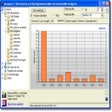
Analyze your usage of the focal length of your lenses
Create educational applications in a completely visual environment

iWatermark: A Comprehensive Watermarking Tool

Vectorizer and image cleaner for designers and CAD/CAM professionals

Create photographic compositions from a collection of images

Comprehensive Free Photo Editing Tool

Create custom mosaics with your own photos

Batch resize and edit your digital images
Add a logo to your image
You no longer have to be an artist to create attractive designs

Display two images simultaneously