5
Free
Android Messages For Web
Check Your Android Messages On Your Computer


Safe & trusted downloads
The best software, verified by experts
Check Which Books Are Restricted
One of the biggest challenges of Eflip users is not knowing right off the bat if a book is restricted or not. But don’t worry because this extension was developed to solve that problem. This is a tool that allows you to check for books that you are not allowed to sell.
In order to do this, you will first install it on your browser and log in with your account.
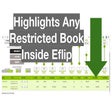
When you do a search on Eflip, you will see some results highlighted in green. The highlight indicates that the book is restricted. So, it instantly narrows down your options and avoids future problems when you unknowingly sell a book that you’re not allowed to sell.

Explore a fun plug-in

Desktop video editing made accessible and efficient

A free app for Chrome, by Zoomcorder.com.

Efficient HTTP Header Management with Netmirror Extension

Epson L380 printer troubleshooter