
1.8
Trial version
Super DVdate
The simple video converter to timestamp video files


Safe & trusted downloads
The best software, verified by experts
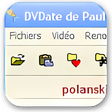
DVdate features a multimedia player which can read the video (including in full screen) and browse easily in the video with CTRL+ array keys, and even browse from scene to scene. It displays in real time the datecode and timecode of the frame being played. DVdate displays also complete information about the AVI file. Like the utility Gspot, it indicates the codec, the image size, the number of frames per second, the duration of the video etc..., when dealing with DV files, it adds the type I or II and the TV standard Pal or NTSC or even the aspect ratio 4x3 or 16x9. It features also a function to display the RIFF header of an avi file, like riffwalk.exe from Microsoft used to do.
DVdate is able to load a great number of avi files into its "playlist", and process them individually or altogether. It displays automatically the video of each selected file.. With one keyboard hit (CTRL+F7) it may even load all avi files present on all your hard drives.

The all-in-one solution for media playback

A free high-quality video downloading platform

Download Adobe Premiere Pro for Windows – Professional Video Editing at Your Fingertips

A very powerful and versatile free file converter.

The industry standard for professional motion design
Trial version
The simple video converter to timestamp video files
Free
Effortless Video Conversion for iPad Users
Free
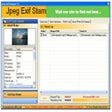
Stamp your pictures with EXIF data

Trial version
DVDFab

Free
See what codec is being used in video and audio DivX files

Free
Comprehensive Video Editing with VirtualDubMod

A simple software for cutting videos

Underwhelming media player

A Free Home & hobby program for Windows

Convert your VHS tapes to DVD, avi or mpeg

Discover and watch the best trending videos
Easy to use audio to video converter

Gaupol: Free Multimedia Subtitle Editor

Basic but slick video editor for Windows 8

Make a Single Video File Out of Multiple Files

DVD Player Pro For Windows 10

Convert your Powerpoint presentations to AVI, WMV, GIF, SWF...

A free app for Windows, by chrispc.