




2
Free
Control Center
Control Center: Customize Your Phone with Ease


Safe & trusted downloads
The best software, verified by experts
Control Center iOS 16: Quick Access to Your Favorite Apps and Settings
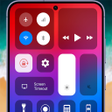
Control Center OS 14 transforms the way you interact with your phone's settings and media, making it all accessible with just a swipe. Its design is inspired by the sleek and modern look of OS versions like X, XS, and Pro Max, packing both aesthetics and functionality into one. With this tool, toggling your WIFI, Bluetooth, and screen rotation becomes a breeze. It also makes managing your media playback straightforward, with controls for play, pause, and track navigation easily within reach. Adjusting your device’s brightness and volume, accessing essential features like the flashlight, clock, and camera, or even capturing screenshots and recording your screen, are all just a tap away. Plus, you can personalize it by adding your most-used apps for quick access. Whether you're swiping up from the bottom or sides, Control Center OS 14 brings convenience and efficiency to your fingertips, simplifying your daily mobile interactions.
Free
Control Center: Customize Your Phone with Ease
Free
iOS 18 Control Center
Free
Efficient iOS-Style Quick Access Panel for Android
Free
Personalize Your Mobile Experience with Control Center
Free
Control Center - iOS Style Overview
Free
Control Center Plus: Android App Review

PilotCam: Access Your Camera Easily

File Manager - Folder Manager: A Comprehensive File Management Tool for Android

Topi Lite: Secure and Fast VPN for Android

Kubet - ku casino calculator: A Convenient Tool for Mathematical Calculations

A free program for Android, by NJ Tech SG.

Quickly scan QRcode
Calculate Your Monthly Salary Easily with حساب الأجرة المغرب

Virtus Filemanager: A Powerful File Management Tool for Android

FastSign: Professional Electronic Contract Signing and Management

TorrDroid: T-orrent Downloader

Photo to Video Converter: Create stunning videos with your photos

Unlock Your Music Potential with ArtistOne