





4.3
Free
USB Camera - Connect EasyCap or USB WebCam
Use Your Mobile Phone as a Webcam with the Free USB Camera Application


Safe & trusted downloads
The best software, verified by experts
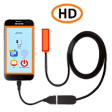
How to Use Chinese Endoscope With USB Camera
How to use Chinese endoscope with USB camera:
First, download Chinese endoscope from Google Play or Android Market.
After the download, you must open the app.
The camera must be connected to the USB port of the device to make a video or take a picture. Please note that the video resolution is highly dependent on the endoscope model and resolution of the video output.
You can see the photo or video you are recording in the image of the screen. You can also save photos to the folder and record videos to the folder.
Moreover, you don't have to worry about anything else because this app is created for free.
Free
Use Your Mobile Phone as a Webcam with the Free USB Camera Application
Free
How to Use the Endoscope App
Free
The Picture-In-Picture Video Inspection Application for Android Devices
Free
USB endoscope viewer for mobile devices
Free
USB CAMERA - Connect Your External Camera to Your Android Device
Free
Collect memories you can keep
Network Signal Speed Booster: Secure Your Digital Freedom

Flydigi Game Center: The Ultimate Gamepad Companion for Android
Comprehensive Guide for EZVIZ Camera App Users

Effortless TV Control with RemotEasy

Optimize Your Gaming Sensitivity Settings

Fast and Free VPN Service for Android

Parrot Drones: A Comprehensive Micro Drone Equipment for Enterprise and Agriculture

A free program for Android, by MacTank.

Comprehensive Lottery Analysis Tool

Explore Global Festivals with DayMuse

Efficient Data Recovery Tool for Android Users