





3.6
Free
Screenshot Captor
Capture your PC screen instantly and easily


Safe & trusted downloads
The best software, verified by experts
Capture screenshots by mouse or keyboard then save, share and print and automate all of that.
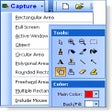
ScreenShot captures your current screen view and provides you with options to modify, display, save, print or copy to clipboard. Shots/views can be captured in full-screen, active window or cursor selections. Optionally use the editor to grab specific window parts. Save and re-open the results in your favourite graphic application. Define and automate a custom your screenshot process. Every step in the process can be executed automatically. The tool is easy to use. The included wizard guides you through the process. ScreenShot is made for all users but popular with computer journalist, documentation creators and for home users. Fully functional trial version. Screenshot runs in your system tray.
Capture ScreenShot Pro let's you automate each step in the process. You can use with every function like print or save the auto-click function. The software is then executing the steps automatically for the next screenshot.
ScreenShot is made for all users but popular with computer journalist, documentation creators and for home users.
Free
Capture your PC screen instantly and easily

Free
Free software to capture images within a computer screen
Free
Efficient and Free Screen Capture Tool

Free
Make a Page an Imae with Screen Capture, Screenshot Share/Save

Free
Easy to use and quick screenshots
Free
Capture your screen simply and for free
Capture your PC screen instantly and easily

Excellent and functional snapshot tool
Efficient Screen Capture Tool for Windows

Capture DVs very easily

Capture Your Screen Effortlessly with SS Recorder

Get the best video quality possible from a Windows PC
Take screenshots instantly with the Print key
Capture variously sourced videos to AVI
Combine several pages into one TIFF file
Capture your PC screen, edit it and share

Capture complete web pages from start to end

Capture webcam footage to a video file