

Barquee for Mac
Control iTunes from your Mac’s menu bar
- Trial version
- 1.8(3)
- 1.2K
- V 1.2
Control iTunes from your Mac’s menu bar
Barquee is a compact macOS utility that puts iTunes controls directly in your menu bar, letting you manage music playback without opening the full iTunes interface. It supports core functions like play, pause, skip, and volume adjustment, all from a tidy dropdown. With support for hotkeys and customizable text display, it offers a streamlined way to control your library in real time.
Originally built for older macOS systems and classic iTunes versions, Barquee remains a handy tool for vintage setups. Its lightweight design and minimal interface make it ideal for users who prefer fast, unobtrusive control over flashy visual extras.
Minimalist music control without distractions
Barquee adds a lightweight, customizable iTunes controller directly to your Mac’s menu bar, giving users immediate access to basic playback functions like play, pause, skip, and volume control. Track title and artist information are displayed clearly, allowing you to glance at what’s playing without switching windows. It’s ideal for users multitasking across apps who want quick control over their music without launching or tabbing into the full iTunes window.
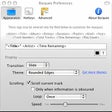
One of Barquee’s strongest features is its level of visual customization. Users can tweak font size and style, apply drop shadows, limit scrolling width, and control how track titles display across the menu bar. If you don’t want a scrolling ticker, you can adjust its speed or turn it off entirely. The app also supports global hotkeys, letting you control playback with the keyboard alone—a convenient touch for power users who prefer streamlined, mouse-free navigation.
Originally developed for iTunes versions 4 through 7 and macOS 10.3–10.4 (Panther and Tiger), Barquee is now considered abandonware. It hasn’t been updated since 2006 and may not function on modern Macs without workarounds or virtualization. However, for those running older setups—or collectors of niche, minimalist Mac tools—it still offers clean, focused playback control with just enough customization to stay useful.
A legacy tool for vintage music control
Barquee isn’t built for today’s macOS, but it still holds appeal for users sticking with legacy systems or seeking minimalist tools. Its unobtrusive presence and reliable functionality make it a hidden gem for vintage Mac setups running older versions of iTunes. While it won’t suit modern streaming habits or newer devices, Barquee continues to offer a clean, efficient way to manage playback—one that quietly does its job from the corner of your screen.
Pros
- Quick playback access from the menu bar
- Customizable text display and scrolling behavior
- Global hotkey support for music control
- Lightweight and unobtrusive
Cons
- No support for Apple Music or modern audio apps
- Incompatible with recent macOS versions
- Requires iTunes to function
- No playlist browsing or album art display
Barquee for Mac
- Trial version
- 1.8(3)
- 1.2K
- V 1.2
Top downloads

AnyDesk
Remotely access another computer

Microsoft Remote Desktop Connection
Remote access tool for managing systems

Chrome Remote Desktop
Effortless Remote Access with Chrome Remote Desktop

AirDroid Cast
Streamline Your Mac with AirDroid Cast

TeamViewer QuickSupport
Efficient Remote Support with TeamViewer QuickSupport
Discover more programs

JollysFastVNC
- 5
- Free
Efficient Remote Control Software for Mac

TuneConnect
- 4.5
- Free
TuneConnect: A Free Remote Control App for Mac

InterMapper RemoteAccess
- 4.3
- Trial version
Efficient Remote Control Solution for Mac

launchTunes
- 4.8
- Trial version
Control your iTunes from another Mac

KavaTunes
- 4.7
- Trial version
KavaTunes: Remote Control Software for Mac
M-Beat
- 1.7
- Free
Control iTunes from the menu bar
netTunes
- 4
- Trial version
Control your music from anywhere

iMote
- 4.5
- Free
iMote: Free Remote Control Software for Mac

TotalTunes Control
- 3.4
- Free
Remote control with hotkeys for iTunes

ShareTool
- 4.5
- Trial version
Efficient Remote Control Solution for Mac

FluidTunes
- 3.6
- Free
FluidTunes: A Free Remote Control App for Mac