

Backup Made Simple for Windows
- Trial version
- 4.8
- 369
- V 5.1.204
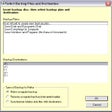
Backup Made Simples contains a comprehensive set of features to let you make backups the way you want, and is easy to set up and use even for non-technical users.
In no time at all you'll be making a backup of the important information on your computer, confident that everything you need is protected. The software has a number of features designed specifically with flexibility and ease of use in mind.
Back up or synchronize
Our software can make a traditional backup, and it can also synchronize folders and files with copies on another hard drive or another computer.Sychronization is a good alternative to a regular backup when your goal is to keep a second copy of important files, or move files between computers so you can work on either one.
Backup plan wizard
Our Backup Plan Wizard will help you find everything on your computer you need to back up, even if you don't know where it is.If you know where something is you can just browse your hard drive and select it with our Windows Explorer-like user interface as well.
Backup plans remember what to do
Once you've figured out what to back up and configured the software to do this, your instructions are saved as a "Backup Plan".The next time you want to make the same backup, just choose your plan from the list of saved plans. No more trying to remember what you did the last time.
Keep backups small by only saving recently changed files
A total backup of a large hard drive may require many backup discs. You should invest the effort to do this once in a while, but why waste all that time and all those backup discs every time when most of the files on your computer never change?Our software will let you back up only those files that have changed, so in most cases your regular backups will fit on a single disc.
Adapts automatically when folders change
With most backup software you have to remember to reconfigure your backup program in some way if you add or rename folders or files and you want to back them up.Not with ours. Our software automatically includes and new subfolders and files if the folder they were added to was already included in the backup.
Backup Made Simple for PC
- Trial version
- 4.8
- 369
- V 5.1.204
Top downloads





Discover more programs
Driver Magician
- 3.9
- Trial version
Device driver backup, restoration and update tool
File Backup Watcher
- 4
- Trial version
Make security backups on any support
GRBackPro
- 5
- Trial version
Professional backup for Windows
FileBack PC
- 4.5
- Trial version
Backup copies and synchronizing functions for your PC
Cascade Point
- 4.9
- Trial version
A trial version Security program for Windows

KR-Folder Backup
- 0.5
- Free
Make ZIP backups of your folders
PicoBackup
- 3.3
- Trial version
Easy-to-use backup utility packed with many powerful features
Allmydata
- 4.7
- Free
Save all your important files online
SimpleBackup
- 4.3
- Free
Make backups with one simple click
Magic Transfer
- 3.5
- Free
Sychronise working between different computers

Blogger Backup
- 4.8
- Free
Make backup copies of Blogger posts and comments