5
Free
AI Art and AR Tracing: Cupixel
All-in-one creative tool


Safe & trusted downloads
The best software, verified by experts
<h2>AstroCam turns your Android into a night‑sky photography rig</h2>
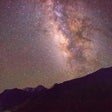
AstroCam - The Astrophotography Camera App, from SLSH, helps you turn a compatible Android phone into a dedicated night-sky camera for serious hobby work. The app gives you sensor-level manual control over exposure behavior so you can capture extended-shutter images and avoid automatic exposure limits. It emphasizes long-exposure capture, dark-environment controls, and post-processing-ready outputs. If you own a tripod and a Camera2-capable device, it aims to expand what your phone can record of the night sky.
You can use the app to photograph the Milky Way, create star trails, and attempt imaging of brighter deep-sky subjects by prolonging exposure times and fixing focus. The workflow assumes you mount your device on a tripod and compose in low light, then let the sensor gather photons over long exposures. Long-shutter photography and fixed-focus overrides are the practical outcomes, letting you produce single long exposures or sequences for creative night-sky results.
The app saves images as RAW (DNG) and JPEG, provided your phone’s hardware allows RAW capture. RAW output gives you full-bitlinear data for aggressive post-processing and color recovery, while JPEG provides immediate, viewable results. RAW export lets you bring frames into desktop tools for noise reduction and tone recovery, an essential step if you plan to stack multiple frames or perform detailed edits.
The interface is deliberately minimalist and tuned for dark conditions, so you can access critical controls without menu clutter. You still need a basic understanding of exposure, noise, and focus to make the most of manual settings; the app does not replace learning camera basics. The intervalometer and manual focus override lower the barrier to sequence work, but you should expect a short learning curve to capture clean, usable frames.
The app runs on Android devices starting at version 5.0, but full functionality depends on Camera2 API support and manufacturer-enabled manual modes. Some high-end Samsung Galaxy models exhibit known stability problems, which the developer has acknowledged and is addressing. Hardware permissions and vendor implementations therefore determine whether you get consistent long-exposure control or encounter session interruptions.
If you want to move from casual night snaps to a post-processing workflow, the app can act as a practical gateway: it supplies the capture-side capabilities you need to collect stackable frames and time-lapse sequences. Verify your phone exposes the Camera2 manual modes and accept that some device models show stability issues; with supported hardware and a tripod, you get a capable mobile starting point for deeper astrophotography work.

A powerful free tool for video professionals

AI-powered photo editing software

Advanced camera controls for mobile photography

Trendy presets for editing photos and videos
Advanced video editing for smooth slow motion
Free
All-in-one creative tool
Free
AI-powered photo editing software
Paid
A DSLR-like app
Free
Third-party Google camera port

Free
A free photo and video editing tool

Free
Pocket-sized advanced photo editor
Creative video editing made simple

Bring Out the Best in Your Photos
Efficient Digital Viewfinder for Filmmakers

A free program for Android, by Vertexshare Software Ltd.
A free app for Android, by Magic Studio INC.

ArtMovie - ProMovie Recorder: Professional-Quality Video Recording on Your Mobile Device

Transform Your Photos with PixelPro - AI Art Studio

Transform Your Memories with Hug My Younger Self
Explore Fashion Trends with Outfit App

Transform Selfies into Professional Photos Quickly
Transform Photos with 3D Action Figures
Transform Photos with Lumo – PhotoEditor