





4.9
Paid
Made With B
Elegant Calligraphic Font for Creative Projects


Safe & trusted downloads
The best software, verified by experts

<h2>Installable calligraphy script font in TrueType format</h2>
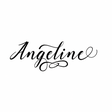
Angellina, created by Angellina, is a calligraphy script font designed to add a refined hand-lettered tone to headings, invitations, and brand marks. It renders flowing strokes and decorative flourishes suited to decorative typography while aiming to preserve readability in display uses. The typeface targets graphic designers, wedding planners, DIY crafters, and social media creators who need a handcrafted appearance without commissioning custom lettering. The developer distributes the design through popular typography repositories for straightforward download and use.
The font ships with a complete set of uppercase and lowercase characters, plus standard numerals and basic punctuation, delivered in TrueType (.ttf) format. That format installs on desktop systems and integrates with application font menus, so designers can select the face directly inside layout and word-processing software. Because distribution is a standard font file, the face slots into print and digital workflows without additional tooling.
The standard release covers basic Latin characters only, so accented letters and extended language glyphs are not guaranteed. The download notes advise users to consult the font's character map for specific glyph availability. This constraint matters for multilingual branding or event work, where missing diacritics require either a different typeface or separate glyph sourcing before finalising layouts.
Installation follows a conventional desktop workflow: right-click the .ttf file and choose Install, after which the face appears in application font lists such as Microsoft Word. The font is compatible with Windows and macOS and functions in any program that uses system-installed fonts, including Microsoft Office and Adobe Creative Cloud. The developer publishes the design on common typography repositories, where it has gathered substantial downloads among creators.
Because the design balances decorative strokes with maintained readability, the font suits designers and event planners who need a handwritten display face for headings, logos, and invitations. License terms vary across distributions and the standard package covers only basic Latin, so check the included license file and the font's character map before commercial or multilingual use. The font is a sensible option when a professional calligraphic voice is required without bespoke lettering.
Paid
Elegant Calligraphic Font for Creative Projects
Free
Handmade calligraphy font

Paid
Script font for decorative projects with wide glyph support

Paid
Elegant Script Font for Personalization Projects

Paid
Ming Imperial: A Versatile Font Family

Paid
Full-license modern calligraphy font in TrueType and OpenType formats